miércoles, 6 de junio de 2012

How to use Change Data Capture (CDC) in Microsoft SQL Server 2012


Often we require saving all the history of the changes of our databases. Most of the time is related to data security purposes. There are several ways to accomplish that, from triggers, timestamps to stored procedures.
But since SQL Server 2008 there is a new data tracking and capturing feature in user-created tables, it is called CDC. In this article, we will see how to use CDC and how efficiently it could serve to our purpose.

Fig 1


Enabling Change Data Capture on a Database
By default CDC comes disabled, so we need to enable it first on the database. Because CDC is a table-level feature, it then has to be enabled for each table to be tracked.
You can run the following queries, first to create databases and tables, and then to enable CDC and check if it’s enabled.
So, first we need to create the database:
create database Contoso

Creating Tables….
Articles
USE [Contoso]
GO


/****** Object:  Table [dbo].[Articles] ******/
SET ANSI_NULLS ON
GO


SET QUOTED_IDENTIFIER ON
GO


SET ANSI_PADDING ON
GO


CREATE TABLE [dbo].[Articles](
    [Article_ID] [int] NOT NULL,
    [Articles] [varchar](50) NOT NULL,
    [Cost] [float] NULL,
 CONSTRAINT [PK_Articles] PRIMARY KEY CLUSTERED 
(
    [Article_ID] ASC
)WITH (PAD_INDEX = OFF, STATISTICS_NORECOMPUTE = OFF, IGNORE_DUP_KEY = OFF, ALLOW_ROW_LOCKS = ON, ALLOW_PAGE_LOCKS = ON) ON [PRIMARY]
) ON [PRIMARY]


GO


SET ANSI_PADDING OFF
GO


Customers


USE [Contoso]
GO


/****** Object:  Table [dbo].[Customers] ******/
SET ANSI_NULLS ON
GO


SET QUOTED_IDENTIFIER ON
GO


SET ANSI_PADDING ON
GO


CREATE TABLE [dbo].[Customers](
    [Customer_ID] [int] NOT NULL,
    [Name] [varchar](50) NULL,
    [Last_Name] [varchar](50) NULL,
    [Phone] [int] NULL,
 CONSTRAINT [PK_Customers] PRIMARY KEY CLUSTERED 
(
    [Customer_ID] ASC
)WITH (PAD_INDEX = OFF, STATISTICS_NORECOMPUTE = OFF, IGNORE_DUP_KEY = OFF, ALLOW_ROW_LOCKS = ON, ALLOW_PAGE_LOCKS = ON) ON [PRIMARY]
) ON [PRIMARY]


GO


SET ANSI_PADDING OFF
GO


Orders


USE [Contoso]
GO


/****** Object:  Table [dbo].[Orders] ******/
SET ANSI_NULLS ON
GO


SET QUOTED_IDENTIFIER ON
GO


CREATE TABLE [dbo].[Orders](
    [Orders_ID] [int] NOT NULL,
    [Customer_ID] [int] NOT NULL,
    [Article_ID] [int] NOT NULL,
    [Quantity] [int] NULL,
    [Total] [float] NULL,
 CONSTRAINT [PK_Orders] PRIMARY KEY CLUSTERED 
(
    [Orders_ID] ASC
)WITH (PAD_INDEX = OFF, STATISTICS_NORECOMPUTE = OFF, IGNORE_DUP_KEY = OFF, ALLOW_ROW_LOCKS = ON, ALLOW_PAGE_LOCKS = ON) ON [PRIMARY]
) ON [PRIMARY]


GO


ALTER TABLE [dbo].[Orders]  WITH CHECK ADD  CONSTRAINT [FK_Orders_Articles] FOREIGN KEY([Article_ID])
REFERENCES [dbo].[Articles] ([Article_ID])
GO


ALTER TABLE [dbo].[Orders] CHECK CONSTRAINT [FK_Orders_Articles]
GO


ALTER TABLE [dbo].[Orders]  WITH CHECK ADD  CONSTRAINT [FK_Orders_Customers] FOREIGN KEY([Customer_ID])
REFERENCES [dbo].[Customers] ([Customer_ID])
GO


ALTER TABLE [dbo].[Orders] CHECK CONSTRAINT [FK_Orders_Customers]
GO

After creating tables you should have something similar to this:


Fig 2

Inserting data to tables
Articles
USE [Contoso]
GO


INSERT INTO [dbo].[Articles]
           ([Article_ID]
           ,[Articles]
           ,[Cost])
     VALUES
           (1000,'Milk',4.5),
           (1001,'Coke 2L',6),
           (1002,'Cookie small',0.5),
           (1003,'Cookie medium',1),
           (1004,'Cookie Large',4)   
GO
Customers
USE [Contoso]
GO


INSERT INTO [dbo].[Customers]
           ([Customer_ID]
           ,[Name]
           ,[Last_Name]
           ,[Phone])
     VALUES
           (2000,'George','Lucas',555123456),
           (2001,'Carlos','Blanca',555456789),
           (2002,'Bill','Hampton',555415639)
GO


Orders
USE [Contoso]
GO


INSERT INTO [dbo].[Orders]
           ([Orders_ID]
           ,[Customer_ID]
           ,[Article_ID]
           ,[Quantity]
           ,[Total])
     VALUES
           (3000,2002,1000,2,9),
           (3001,2001,1001,3,13.5),
           (3002,2000,1002,5,18)
GO


Now let's review how to enable CDC on a database.
EXECUTE sys.sp_cdc_enable_db;

Then, how to check if CDC is enabled correctly
SELECT name,is_cdc_enabled FROM sys.databases WHERE name='Contoso'

You should see something like this:


Fig 3

Now that CDC is enabled on the Contoso database, let’s enable CDC on specific tables (e.g. Customer’s table), just make sure the SQL Server Agent service is up and running, also that you have roles created, if you don’t have roles you can pass NULL as parameter in @role_name.
EXEC sys.sp_cdc_enable_table
    @source_schema ='dbo',
    @source_name ='Customers',
    @role_name ='CustomersRole',
    @supports_net_changes = 1

In order to check that CDC is enabled correctly for Customer’s table, you can execute this SQL statement.
SELECT name,is_tracked_by_cdc FROM sys.tables WHERE name='Customers'

You should see something similar to this:
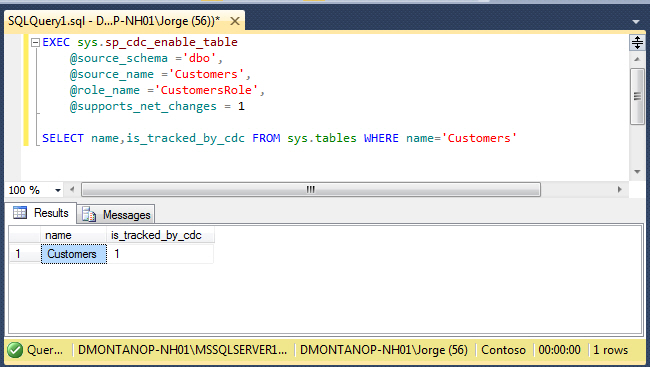

Fig 4

For disabling CDC on the table, sys.sp_cdc_disable_table needs to be executed.
EXEC sys.sp_cdc_disable_table
  @source_schema ='dbo',
  @source_name ='Customers',
  @capture_instance ='dbo_Customers'


Similarly, for disabling CDC at the database level, we need EXEC sys.sp_cdc_disable_db.

Tip. In the SQL Server Agent Service you can check that CDC is enabled if you see something similar to this:


Fig 5

How to see data generated by CDC

First you need to know what LSN is. LSN (Log Sequence Number) is a number that identifies each register that is recorded in the transaction log of the database with a LSN provided by SQL Server.

Also you need to know that CDC displays operations done in the tables with the help of Column_$operation ID’s.  A Column _$operation contains value which corresponds to DML Operations. Following is quick list of value and its corresponding meaning.

• Delete Statement = 1
• Insert Statement = 2
• Value before Update Statement = 3
• Value after Update Statement = 4
Now execute some DML in the Customers table for the CDC to be able to track changes.
DELETE FROM Customers WHERE Customer_ID=2003
INSERT INTO Customers VALUES(2005,'Mary','McGregor',555789412)
UPDATE Customers SET Name='Jorge' WHERE Customer_ID=2000
UPDATE Customers SET Name='Charles' WHERE Customer_ID=2001

A delete, an insert, and two updates have been fired. To see the captured changes, SQL provides two functions:
• cdc.fn_cdc_get_net_changes_dbo_Customers
• cdc.fn_cdc_get_all_changes_dbo_Customers
As the name suggests, the 'net changes' function gives the net changes on the records and the 'all changes' function provides all the changes before and after the DML is executed.
DECLARE @Begin_LSN binary(10), @End_LSN binary(10)
-- get the first LSN 
SELECT @Begin_LSN =sys.fn_cdc_get_min_lsn('dbo_Customers')
-- get the last LSN 
SELECT @End_LSN =sys.fn_cdc_get_max_lsn()
-- returns net changes
SELECT * FROM cdc.fn_cdc_get_net_changes_dbo_Customers(
 @Begin_LSN, @End_LSN,'ALL');

/*__$start_lsn __$operation __$update_mask Customer_ID Name Last_Name Phone
---------------------- ------------ ---------------- ----------- ----- -----
0x0000004D000003600003  4   NULL    2000    Jorge   Lucas   555123456
0x0000004D000003680003  4   NULL    2001    Charles Serrano 555456789
0x00000050000000700005  1   NULL    2003    Jorge   Montano 555442641
0x0000004D000003580003  2   NULL    2005    Mary    McGregor    555789412
(4 row(s) affected)*/

cdc.fn_cdc_get_net_changes_dbo_Customers gives us all the records net changed falling between the LSN we provide in the function. We have three records returned by the net_change function; there was a delete, an insert, and two updates, but on the same record. In case of the updated record, it simply shows the net changed value after both the updates are complete.
For getting all the changes, execute cdc.fn_cdc_get_all_changes_dbo_Customers; there are options either to pass 'ALL' or 'ALL UPDATE OLD'. The 'ALL' option provides all the changes, but for updates, it provides the after updated values.

DECLARE @Begin_LSN binary(10), @End_LSN binary(10)
-- get the first LSN 
SELECT @Begin_LSN =sys.fn_cdc_get_min_lsn('dbo_Customers')
-- get the last LSN 
SELECT @End_LSN =sys.fn_cdc_get_max_lsn()
-- returns all changes both before & after update values for UPDATE
SELECT * FROM cdc.fn_cdc_get_all_changes_dbo_Customers(
 @Begin_LSN, @End_LSN,'ALL');

 /*__$start_lsn __$operation __$update_mask Customer_ID Name Last_Name Phone
---------------------- ------------ ---------------- ----------- ----- -----
0x00000031000000200003  0x00000031000000200002  4   0x04    2001    Carlos  Serrano 555456789
0x0000004D000003580003  0x0000004D000003580002  2   0x0F    2005    Mary    McGregor    555789412
0x0000004D000003600003  0x0000004D000003600002  4   0x02    2000    Jorge   Lucas   555123456
0x0000004D000003680003  0x0000004D000003680002  4   0x02    2001    Charles Serrano 555456789
0x00000050000000700005  0x00000050000000700002  1   0x0F    2003    Jorge   Montano 555442641
(5 row(s) affected)*/

What is the utility of using CDC?
The essence of CDC can be effectively put to use. Let us see a very simple demonstration of its utility using a PROCESS table and a stored procedure that saves all track changes from Customers.
CREATE TABLE PROCESS
(Process_ID INT IDENTITY (1,1),
 Process_Date DATETIME,
 BEGIN_LSN BINARY(10),
 END_LSN BINARY(10))

So the table has been created to log the minimum and maximum LSN during each job run. When the stored procedure runs, it will make an entry with the Process_ID, the date-time stamp of its run, and the minimum and maximum of the LSN for the records modified. For logging the details in the created table, the Stored Procedure below has been created. A job can call and execute the procedure at the very last step before it exits.
IF EXISTS(SELECT 1 FROM Contoso.sys.objects
WHERE name='ProcessLogEntry'AND [type]='P')
DROP PROCEDURE ProcessLogEntry
GO
CREATE PROCEDURE dbo.ProcessLogEntry


AS


SET NOCOUNT ON
SET QUOTED_IDENTIFIER ON
SET ANSI_NULLS ON


BEGIN
DECLARE @BEGIN_LSN BINARY(10)


      IF ((SELECT COUNT(1)FROM PROCESS)>0)
      BEGIN
            SELECT @BEGIN_LSN=MAX(END_LSN)FROM PROCESS 
            INSERT INTO PROCESS SELECT GETDATE(),
            @BEGIN_LSN,sys.fn_cdc_get_max_lsn();
END
ELSE
INSERT INTO PROCESS SELECT GETDATE(), 
       sys.fn_cdc_get_min_lsn('dbo_Customers'),sys.fn_cdc_get_max_lsn();


END;

Well, we execute the procedure manually; it makes the entry for the LSN for the DML we executed previously, i.e.: an insert, a delete, and two updates.
EXEC ProcessLogEntry
SELECT * FROM PROCESS

/*Process_ID    Process_Date    BEGIN_LSN   END_LSN
1   2012-05-21 01:31:28.277 0x00000000000000000000  0x00000054000001700001
(1 row(s) affected)*/

As it is logged, let’s execute some more DML:
INSERT INTO Customers VALUES(2008,'Juan','Perez',555123678)
UPDATE Customers SET Last_Name='Lopez' WHERE Customer_ID=2008

We have inserted a record and updated the department for Customer_ID 2. To log the changes, we execute the procedure ProcessLogEntry again.
EXEC ProcessLogEntry
SELECT * FROM PROCESS

/*Process_ID    Process_Date    BEGIN_LSN   END_LSN
1   2012-05-21 01:31:28.277 0x00000000000000000000  0x00000054000001700001
2   2012-05-21 01:34:12.227 0x00000054000001700001  0x00000055000000D00003
(2 row(s) affected)*/

The second entry has been made in our Process table. Now, this enables us to get the changes done by the job on any specific day. The code below gets the net changes done by process_id =2.
DECLARE @Begin_LSN BINARY(10), @End_LSN BINARY(10)
SELECT @Begin_LSN = BEGIN_LSN FROM PROCESS WHERE Process_ID=2
SELECT @End_LSN = END_LSN FROM PROCESS WHERE Process_ID=2
SELECT * FROM cdc.fn_cdc_get_all_changes_dbo_Customers(
 @Begin_LSN, @End_LSN,'ALL');


 /*__$start_lsn __$seqval   __$operation    __$update_mask  Customer_ID Name    Last_Name   Phone
0x00000055000000C80003  0x00000055000000C80002  2   0x0F    2008    Juan    Perez   555123678
0x00000055000000D00003  0x00000055000000D00002  4   0x04    2008    Juan    Lopez   555123678
(2 row(s) affected)*/

As you can see there were two records that are related to process 2, and we get detailed information about the changes.


Summary
Data Base Administrators sometimes has tried to create systems that record all the changes made to the data in a database.  Since SQL Server 2008 and currently with SQL Server 2012, we have this great tool called CDC that comes with SQL Server that allows us to track changes in our data. It could be used to track guys that are trying to gain unauthorized access or executing DML (update/delete). All the details as to who fired the query, timestamp, and the actual query can be recorded for helping DBA personnel report any unethical activities on the server. This will go a long way to boost the security of the servers and help organizations preserve the most important aspect of their business: confidential information.

lunes, 4 de junio de 2012

Encrypt your code with Crypto Obsuscator

I was trying to protect my code from the competitors by myselft when I thought:

Is there a cheap, easy to use software to protect .net projects ?
I Google a lot and test many programs and finaly I found the Crypto Obfuscator For .Net !

LogicNP Software have developed the Crypto Obfuscator For .Net !
It is very useful software because it allows us to protect our code and intellectual property easily with many options included.


You can try to download a free trial of Crypto Obfuscator For .Net here

Now we are going to see some options of this program.
By the way we don’t need to manually modify our code because it just need to have the .exe file o .dll file and the software Crypto Obfuscator For .Net does the rest.


Well, let’s stop talking and go to the action first. We talked about the main interface don’t forget Crypto Obfuscator For .Net can work without problems with Visual Studio.
This is the GUI:  
As you can see you can obfuscate Classes, Fields, Methods, Properties, Events, Resources and create your rules.

Crypto Obfuscate is the best tool to protect your code.
You can create watermarks, create signing and licencing methods.


 We can choose 4 ways to obfuscate our program:
• Test Mode this method changes the name or renames our process method or class.
Example:
You have a method up
Public void bool up ()
{
// your code here.
}
Your next code will be like this
Public void bool FFF_up ()
{
// your code here.
}
• Cryptography. - This method uses some algorithms to generate hashes to rename the methods or procedures.

• Normal. - This method only change the name to a shorter name for example  your method “run” could be changed to “r”.
• Unprintable.- This method renames all the classes, method, function, procedures with symbols.


We have also some advanced protections options like:
• Encrypt strings. - If we encrypt our string the people can find sensitive information like activation codes, sql connections, password, etc.
• Protect against ILDASM. - If we don’t activate this option the disassembler can be easily decoded.
As you can see, you can also:

  • Rename Symbols
  • Hide internal and external calls
  • Protect, Encrypt, compress Assemblies.
  • Specify the level of obfuscation
  • Reduce the metadata and mark classes as final.

 We can create rules to use when we obfuscate our projects.
This software has a lot of tools to improve the security of our code and it is very easy to use.
If you want to protect your code buying this software is a must.

jueves, 3 de mayo de 2012

Excel format


The power and features that make Microsoft's Excel spreadsheet the business world's standard can be daunting to new and infrequent users. EZ-Format for Excel makes Excel easy by separating data formatting, maintenance, and analysis tasks. It automates the task of formatting worksheets, enables improved, modifiable totaling, and simplifies common tasks such as splitting worksheets and applying row color. The program bundles the maker's EZ-Subtotal and EZ-Split add-ins as well, and it includes the functionality of the EZ-Stat statistical analysis software.

Read more: EZ-Format for Excel - Download.com http://download.cnet.com/EZ-Format-for-Excel/3000-2077_4-10458454.html#ixzz1tp8qNNoM


miércoles, 25 de abril de 2012

Merge Tables Wizard for Excel


Say, you need to compare two Excel spreadsheets, find the updates or new columns and get them to your main table for further analysis. The problem is it's too time-consuming and doesn’t guarantee that all the important data are included.

MergeTables Wizard for Microsoft Excel is a handy alternative to Excel Lookup and Vlookup functions that will automatically compare 2 sheets you specify as master and lookup, uncover matching rows and update your first table. All it takes is five steps and less than a minute.
In addition, you can use one or several columns as matching criteria, add new columns to the main table or update the existing ones, highlight or filter the modified entries.  

How Merge Tables Wizard works

Forget about manual checking of two Excel tables for matching data!

  •        You just select the Master Table - the one that you want to update.
  •        Choose the Lookup Table where the add-in will look for the new data.
  •        Pick matching columns or those with common index fields in both spreadsheets.
  •        Choose the columns to be updated or added to the main table. 
  •        Adjust the merge results using additional options on the last step.

Finishing touch to the merge results

There are some additional options that you may find useful. For matching rows this tool will set the background color of updated cells, update only empty cells in your main table or update only if cells from the lookup table contain data.
Also you can tweak the following options for non-matching rows: Clear background colors of Non-updated cells or Add non-matching rows to the end of the Master Table.
You can also mark the merged data by adding a status column to the master table that will indicate rows as: Updated, Non-updated or New row. Take the advantage of this option if you want to have this information at hand even after sorting the rows or changing the layout of your worksheet.

Use Merge Tables Wizard to join data from different sources, find and merge matching data from two Excel tables in seconds.

viernes, 20 de abril de 2012

Add-in Express for Microsoft Office and .net

Add-in Express for Microsoft Office and .net is the all-in-one platform for developing any types of Microsoft Office extensibility projects with minimal coding


Add-in Express allows developers to easily create professional extensions for Microsoft Office such as COM add-ins, smart tags, real-time data servers, Excel Automation add-ins and XLL add-ins. It provides special components for integrating applied code with all applications from the Microsoft Office family including Outlook, Word, Excel, Visio, Access, PowerPoint, MapPoint, FrontPage, InfoPath, Project and Publisher.


Add-in Express equips you with a strong solution architecture and coherent programming model complemented by a combination of .net components, designers and deployment tools that will free you from a nightmare of tedious coding and ensure a quick and perfect result.


Using Add-in Express visual designers, wizards, modules and components you can create version-neutral, secure, isolated, deployable and automatically updatable Office extensions with your own toolbars, menus, ribbons, form regions, task panes and keyboard shortcuts in minutes. All available Office versions from 2000 to 2010 and Office suites from Student to Enterprise are supported.


Key Benefits

  •  Visual designers instead of coding. You use visual designers to customize Office menus, toolbars, ribbons, task panes, forms, windows, regions, option and property pages, to add custom and customize built-in toolbars, main and context menus for all Microsoft Office applications. 
  • Version-neutrality. You develop one extension for all available Office versions (2000 - 2010) and Office suites (Student, Home, Standard, Professional, Professional Plus, Ultimate, Enterprise). No need to create different projects for different Office versions since Add-in Express supplies you with a version-neutral core and Office primary interop assemblies (PIAs). 
  • Effective project architecture. Add-in Express provides you with ready-to-use solution templates that accumulate our long-term experience in development and deployment of Office solutions. The Add-in Express architecture makes your Office solutions secure, isolated, managed, deployable and updatable with your minimal efforts. 
  • Advanced Outlook customization offers a unique GUI for your Outlook plug-ins. Use Advanced Outlook Forms and Views Regions to embed custom .NET forms into Outlook views and forms. Populate Outlook windows with any built-in or third-party controls, including e-mail, task and appointment windows, Reading pane, Navigation pane, To-Do bar, etc. Completely replace Outlook views with your .NET forms (as Outlook Today), add you own property pages to Outlook folders, build your own Outlook Navigation Pane shortcuts and do lots of other things to extend the Outlook GUI. As a result, you get full-featured Outlook plug-ins that work on all Outlook versions, across 2000 through 2010. 
  • Special features for extending the Excel GUI. You can build your own real-time data servers and new worksheet functions for Excel 2000 – 2010. Add-in Express supports two ways of creating custom worksheet functions, using Automation add-ins and XLL add-ins. 
  •  Advanced Office task panes for Microsoft Office 2000 - 2010. Being more flexible than native Office task panes, the Advanced Task Panes let you customize the main Excel, Word and PowerPoint windows with native .NET forms that can be resizable, hidden, minimized (like the Outlook To-Do Bar) and dragged between task pane docks. 
  • Easy deployment. With Add-in Express the deployment of your Office extensions is so easy that you forget about it. Each Add-in Express solution contains a setup project with all necessary prerequisites. Several technologies and installation types to deploy and redeploy your solutions are supported: Windows Installer projects, ClickOnce publishing and MSI based web-deployment. 
  • True RAD - you write applied code only. Add-in Express is completely based on the Rapid Application Development approach and reduces the time you used to spend on Office extensions development at least by half. You write applied code only, Add-in Express does everything else. 


Main Features
  • Add-in Express is fully founded on the Office extensibility technology and extends it with unique features which make Office development fast, easy and effective. You use visual designers and special components to:
  • Add custom and customize built-in toolbars, main and context menus with your controls, items and sub-menus for all Microsoft Office 2000 – 2003 applications. 
  • Add new or customize existing tabs for Office 2007 and Office 2010 Ribbon UI. 
  • Build the Quick Access Toolbar and the Office Menu for Microsoft Office 2007. 
  • Build the Backstage View for Microsoft Office 2010. 
  • Add any .NET controls onto Office toolbars. On all versions of Outlook, Word, Excel and PowerPoint, you can place any built-in or third-party controls on Office toolbars. Your own toolbars can be populated with grids, tree views, list views, user controls, forms, etc. 
  • Develop in one project smart tag libraries with multiple, shared or dynamically created recognizers. 
  • Program Excel real-time data servers and tree-viewed real-time data topics. 
  • Develop new Excel worksheet functions (UDF). 
  • Create Excel Automation add-ins and XLL add-ins. 
  • Access any Office objects, their properties and methods, handle their events.
Supported IDEs
  • Visual Studio 2005, 2008 and 2010
  • Visual Basic Express 2005, 2008 and 2010
  • Visual C# Express 2005, 2008 and 2010
Related Links


jueves, 22 de marzo de 2012

My experience

Daniel Calbimonte is a Microsoft Most Valuable professional and a Microsoft Certified Trainer in SQL Server.

https://mvp.support.microsoft.com/communities/mvp.aspx?name=Daniel+Calbimonte


With 9 different Microsoft Certifications in SQL Server, C# and Windows Server. He has 11 years of experience in Microsoft SQL Server and Office.

He developed training Material for SQL Server Administration and Business Intelligence, Analysis Services,

He also helps people in the MSDN page:
http://social.msdn.microsoft.com/profile/dani671/?type=forum

Writter for the MSSQLTIPS.com and  SQLServercentral


He worked as a Quality Engineering Manager, Developer and as a Educational Trainer in different conferences, IT Academies. He is also a Technical and a Video Author for www.profexor.com

His experience includes banking, insurance, HR, government, oil industries, e-commerce, software development and universities.

Some companies that Daniel worked for are:


jueves, 16 de febrero de 2012

What is powershell ?

Many people wants to know what is powershell ?.

Is it a more powerful cmd ?
Is it a powerful environment ?
If I have Windows 2003, can I use powershell or it is only for Windows 2008 ?

If  you have worked with UNIX and Linux, powershell is a natural need that Microsoft required.
Visual Basic was not as powerfull as the born shell, c shell to interact with the OS.
Microsoft noticed, that it was necessary a more powerful shell to support  variables, loops, functions, etc.
Actualmente el cmd era muy limitado para la programación. El Visual Script surgió como una alternativa para automatizar tareas, pero es relativamente lento y se necesitan muchas líneas de código para tareas sencillas que en otros lenguajes como PERL se harían mas fácilmente.


Getting started

Let start with the hello world:
PS C:\> echo ¨Hello world¨

Use variables in powershell
PS C:\>$var=hola mundo
PS C:\>echo $var

How to get help
There are 3 ways to do it:
PS C:\>get-help dir
PS C:\>man dir
PS C:\>help dir

How to get the list of all the commands in powershell
PS C:\>get-help *

More examples about commands in powershell:
http://technet.microsoft.com/en-us/library/dd347701.aspx


Show the drives in Powershell
Get-PSDrive.
This command let you show the different drives.

Use aliasThe alias let you rename or create your own names for the commands.

PS C:\> set-alias get-drive get-psdrive

This command create an alias to the get-psdrive. The new name created for the command is get-drive.
If you execute it, you will have the same results than the get-psdrive


Finalmente, salvamos el archivo y cerramos y abrimos el powershell


Registry


In order to go to the registry in powerhsell use this:

PS C:\> cd hklm:

In order to return to the c: drive use this command:

PS C:\> c:

To clean the screenshot use cls:

PS C:\> cls

If you need to go to the registry drive again use the cd.

PS C:\> cd hklm:

If you want to go to a specific path:

PS HKLM:\> cd software\clients\Calendar\Microsoft*\
Protocols

The command used to create a new registry with powershell is the following:

PS HKLM:\software\clients\Calendar\Microsoft Outlook\Protocols>mkdir reg_nuevo

In order to return to the root use this commad:
PS HKLM:\software\clients\Calendar\Microsoft Outlook\Protocols>cd /

To list the children of the HKLM folder:

PS HKLM:\>Get-ChildItem
PS HKLM:\>ls
PS HKLM:\>gci
PS HKLM:\>dir


If you want to return to the c drive:
PS HKLM:\> c:

Process

In order to display the list of processes
PS C:\> Get-Process

In order to stop a process
PS C:\> Stop-Process -processname [process]


If you need to list the services

PS C:\>Get-service


In order to start a service use this commad:


PS C:\>start-service [service_name]

In order to stop a service use this commad:

PS C:\>stop-service [service_name]


Powershell scripts
By default the scripts are disabled. You can try to execute with this command:

PS C:\> ./prueba.ps1

If you need to enable the policies to run scripts, use this command:

PS C:\> set-executionpolicy unrestricted
Once enable, try again

PS C:\> ./prueba.ps1

How to create a batch file to call a ps script

Step 1.
Create a ps1 file.
Filename: creardir.ps1
Content: mkdir Daniel

Step 2. Create a file with the .bat extension
Filename: createdir.bat
Content: powershell.exe -command .\creardir.ps1


In order to create an event in the event viewer:

PS C:\Documents and Settings\user> EVENTCREATE /T ERROR /ID 1000 /L APPLICATION /D "Test Error"


In order to see the event in the application log:
PS C:\Documents and Settings\user> Get-EventLog -logName "Application"